Changelog
Improved site compatibility and fixed download issues in the latest update for smoother, more reliable performance.
[Latest]
- AD Check it Out: Download Videos from TikTok, IG, FB & More - Fast & Free
- Added S#xcams-24.com: New Downloader
- Updated Tumblr: Bug fixed. It works again.
- Updated CBC.ca: Bug fixed. It works again.
- Added Skland.com: New Downloader
- Added Bouke.media: New Downloader
- Fixed Reddit: Download video with sound
- Added Bnrnews.bg: New Downloader (Audio)
- Added Cijapanese.com: New Downloader
- Updated BiliBili.com: Read a new download instruction!
Download Dplay Videos & Media
Access and save content from Dplay with our versatile and reliable media downloader that supports multiple formats while maintaining original quality. Whether you're a content creator building reference libraries, an educator preserving instructional materials, or simply someone who wants to keep favorite videos accessible offline, our downloader provides fast and efficient service.
The tool automatically detects optimal quality settings and format options based on the source content, ensuring you get the best possible download experience.
Compatible with various devices and operating systems, making it perfect for users who need flexible, high-quality media downloading capabilities across different platforms and content types.
Our Dplay downloader is designed to be fast, reliable, and user-friendly, requiring no software installation or registration.المميزات الرئيسية:
- Multiple format support
- Original quality preservation
- Fast processing
- No registration required
طريقة الاستخدام:
- انسخ رابط الفيديو من Dplay
- الصق الرابط في خانة الإدخال أعلاه
- اضغط على زر "تحميل" للمعالجة
- اختر الجودة والصيغة المفضلة
- احفظ الملف على جهازك
قيود مهمة:
info We can only access publicly available content from Dplay. Private accounts, password-protected content, or media behind login walls cannot be downloaded. Content availability may vary based on platform policies.
صيغة الرابط: A typical Dplay URL looks like: Any valid Dplay video's URL is supported. Let me check it.
تحتاج مساعدة؟ إذا واجهت مشاكل في التحميل من Dplay، تأكد من أن الرابط صحيح ومتاح للعامة. للحصول على مساعدة إضافية، تواصل مع فريق الدعم.
تبحث عن منصات أخرى؟ جرب Universal Video Downloader لدعم مئات مواقع الفيديو الإضافية بما فيها Twitch وLinkedIn وRumble وغيرها الكثير. YouTube, Facebook, أو Instagram.
اتبع هذه الخطوات البسيطة لتحميل المحتوى من Dplay:
الخطوة 1: انسخ الرابط
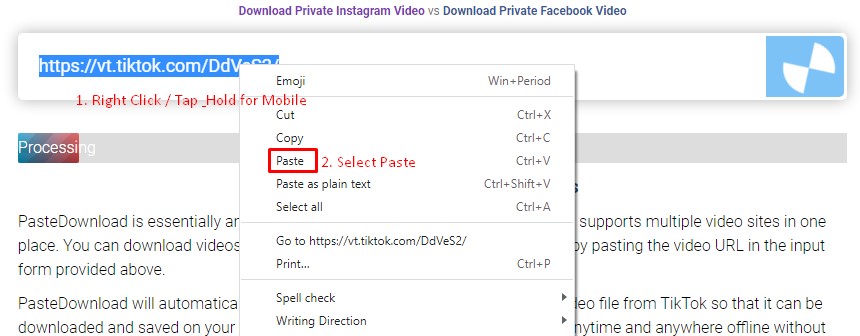
اذهب إلى Dplay وابحث عن الفيديو أو الصوت أو الصورة التي تريد تحميلها. انسخ الرابط من شريط العنوان في المتصفح أو استخدم خاصية المشاركة في المنصة. الصق هذا الرابط في نموذج التحميل أعلاه واضغط على تحميل.
الخطوة 2: اختر وحمل
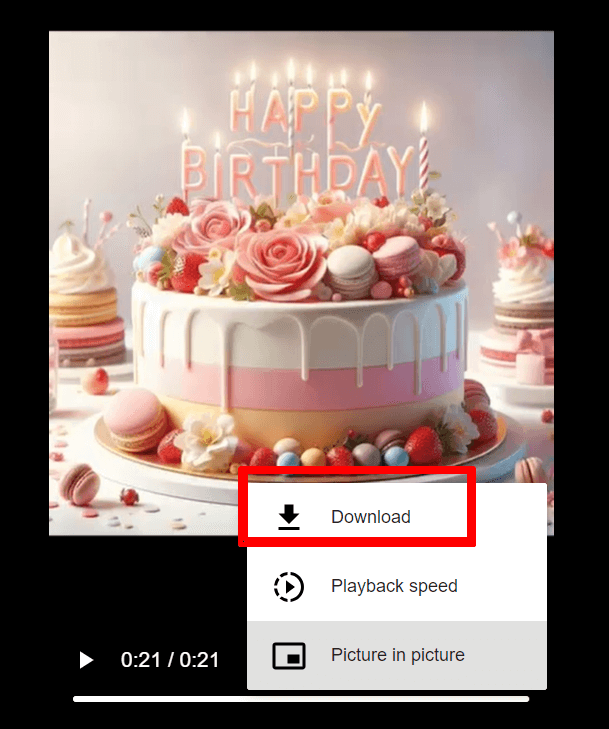
بعد المعالجة، سترى خيارات التحميل المتاحة. اختر الجودة والصيغة المفضلة، ثم اضغط على زر cloud_download تحميل . اتبع تعليمات المتصفح لحفظ الملف على جهازك.
دليل التحميل:

الأسئلة الشائعة
هل PasteDownload آمن؟
نعم، PasteDownload آمن تماماً للاستخدام. خدمتنا تعتمد على الويب ولا تحتاج تحميل أو تثبيت برامج. لا نخزن معلوماتك الشخصية أو المحتوى المحمل على خوادمنا. كل المعالجة تتم في الوقت الفعلي والملفات تنتقل مباشرة إلى جهازك.
ما الجودة والصيغ المتاحة لـ Dplay؟
الجودة: Videos from Dplay are downloaded in their original quality, typically ranging from 480p to 1080p depending on the source.
الصيغة: Most downloads are available in MP4 format for universal compatibility. Audio extraction to MP3 is supported when applicable.
مميزات خاصة: Platform-specific features may vary. For best results, ensure the Dplay content is publicly accessible.
ما هي منصات الفيديو المدعومة؟
PasteDownload يدعم العديد من المنصات الشهيرة مثل YouTube وFacebook وInstagram وTikTok وTwitter وVimeo وDailymotion. للمواقع الأخرى، جرب المحمّل العام.
جميع المنصات الأخرى:
للمنصات الأخرى، استخدم Universal Video Downloader الذي يدعم مئات مواقع الفيديو الأخرى بما فيها Twitch وLinkedIn وRumble وغيرها الكثير.
ماذا أفعل إذا واجهت مشاكل في التحميل؟
إذا واجهت مشاكل في التحميل، جرب هذه الخطوات:
- تحقق من الرابط: تأكد من أن الرابط صحيح والمحتوى متاح للعامة
- جرب متصفح آخر: بعض المتصفحات قد تواجه مشاكل توافق
- عطل مانع الإعلانات: قد يتداخل أحياناً مع عملية التحميل
- امسح ذاكرة المتصفح: البيانات القديمة قد تسبب تعارضات
إذا استمرت المشاكل، تواصل مع فريق الدعم وأرفق:
- الرابط الذي تحاول تحميله
- معلومات متصفحك وجهازك
- لقطة شاشة لأي رسائل خطأ
- وصف ما يحدث عند محاولة التحميل
نحل المشاكل المبلغ عنها عادة خلال 24 ساعة.
هل هناك حدود للاستخدام؟
PasteDownload مجاني تماماً بدون حدود تحميل أو متطلبات تسجيل أو رسوم مخفية. يمكنك تحميل ما تشاء من فيديوهات وصور وملفات صوتية بدون قيود.
خدمتنا مدعومة بإعلانات غير مزعجة، مما يساعدنا على إبقاء المنصة مجانية للجميع مع الحفاظ على خوادم عالية الجودة وتحديثات منتظمة.